
Blesta 6.0 Beta 2 Released
Blesta 6.0.0 BETA 2 has been released! Thanks to everyone who tried Beta 1 and reported issues — this release builds on that feedback with a handful of new additions and a long list of fixes.
Can I participate in the beta?
If you have an owned or monthly license with us directly, you may download blesta-6.0.0-b2.zip in the client area now (Login Required). If you obtained your license from a reseller or distributor, you may be able to participate. Contact your reseller to find out. As with any beta, and especially a major release like this one, this release is for non-production use only and is unsupported. DO NOT UPGRADE YOUR PRODUCTION.
Once you are up and running, head to the beta forums or the Discord beta channel to report any issues and let us know what you think! If you have a license and are verified or become verified on our Discord chat, you’ll have access to the license holder only beta channel.
Visit the Beta Forums! Visit Discord Chat!
Trying the AI features
Blesta 6 introduces optional AI features through Blesta AI, powered by the latest leading models. To try this out during beta, open a ticket from your client account to request a Blesta AI API key. Beta keys are issued manually at our discretion and are temporary: they’ll be revoked once 6.0 is officially released. At that point, you’ll be able to request a new key directly from your account.
What’s new in Beta 2?
The headline additions in this beta:
- Search when adding a service — a new search option on admin Add Service view makes finding the right package fast.
- Embeddable domain search — copy domain search markup to an external website from the order form config.
- Dashboard sidebar control — a new staff option to disable the calendar / quicklinks sidebar on the dashboard.
- Billing > Transactions optimizations — performance improvements for the transactions listing.
Beyond these, Beta 2 includes a long list of fixes across the Support Manager, Order Manager, Domain Manager, Import Manager, multi-company installs, and more — including the removal of the Perfect Money gateway, which is no longer in business.
When is the final release?
Version 6.0 will be officially released after the beta phase has completed. Given that 6.0 is a major release, we expect there will be more betas than typical with a minor release. Once we deem 6.0 stable for production, a final release will be issued. You can help speed things along by participating in the beta!
Blesta 6.0 Beta Released
With much anticipation, we are pleased to announce that Blesta 6.0.0 BETA 1 has been released! This is the biggest update we’ve shipped in over a decade — tens of thousands of lines of new code, an entirely new admin interface, AI features built across the platform, real-time notifications, signed upgrades, and a long list of changes under the hood.
Can I participate in the beta?
If you have an owned or monthly license with us directly, you may download blesta-6.0.0-b1.zip in the client area now (Login Required). If you obtained your license from a reseller or distributor, you may be able to participate. Contact your reseller to find out. As with any beta, and especially a major release like this one, this release is for non-production use only and is unsupported. DO NOT UPGRADE YOUR PRODUCTION. During installation, choose to start a free trial, open a ticket to request a trial key, or use your dev license if you have one. Direct license holders can request a dev license by opening a ticket.
Once you are up and running, head to the forums or the Discord beta channel to report any issues and let us know what you think! If you have a license and are verified or become verified on our Discord chat, you’ll have access to the license holder only beta channel.
Visit the Beta Forums! Visit Discord Chat!
Trying the AI features
Blesta 6 introduces optional AI features through Blesta AI, powered by the latest leading models. To try this out during beta, open a ticket from your client account to request a Blesta AI API key. Beta keys are issued manually at our discretion and are temporary: they’ll be revoked once 6.0 is officially released. At that point, you’ll be able to request a new key directly from your account.
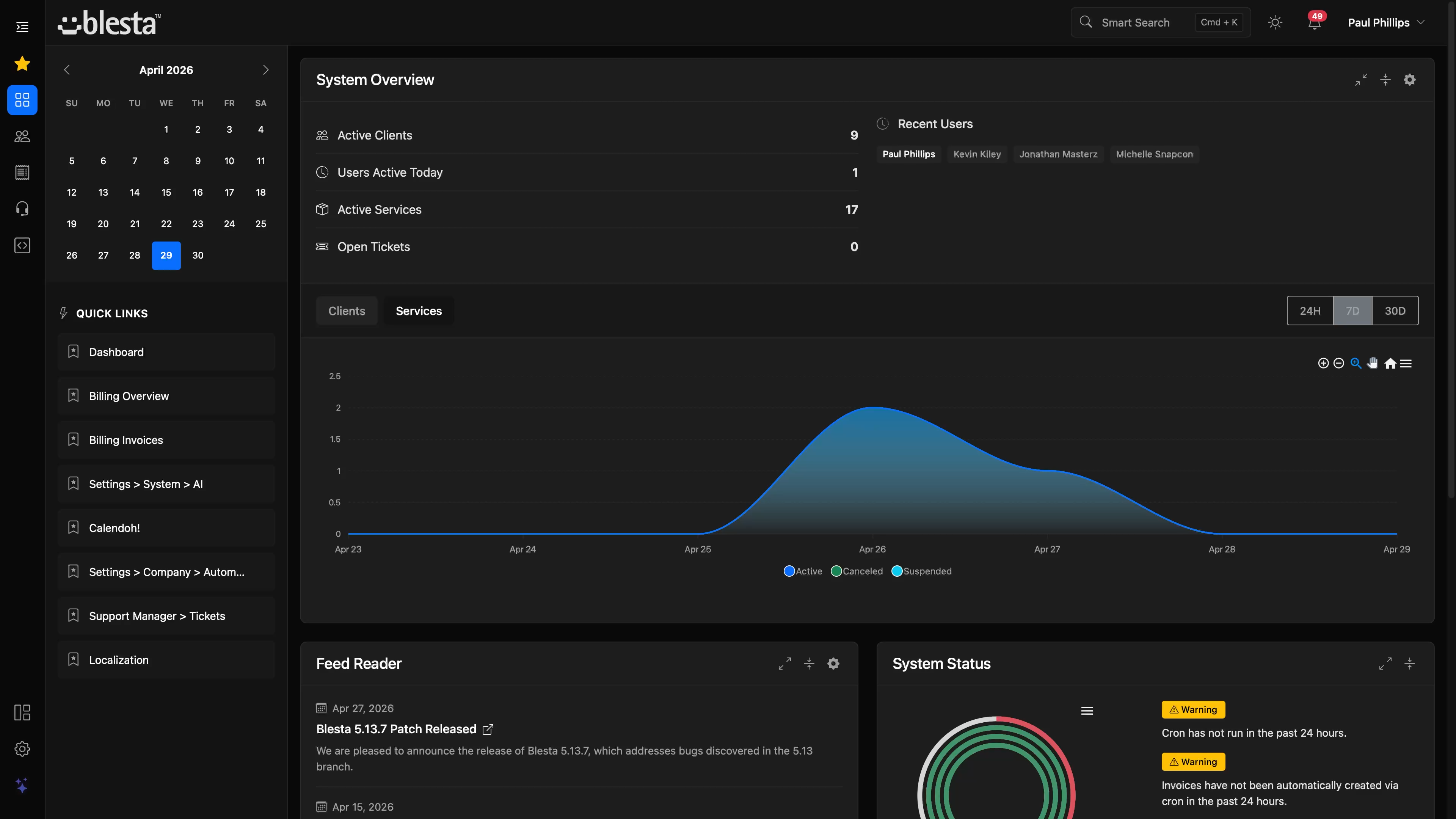
So what is new in 6.0?
Blesta 6 isn’t just an update — it’s a re-imagining. We’ve rebuilt the admin panel from the ground up on Bootstrap 5 with Paradigm, a sleek new UI with dark mode designed in (not retrofitted), a customizable icon bar, contextual side panels, and a redesigned dashboard. A brand-new AI-powered admin chatbot and Blesta AI features extend across support tickets, HTML email templates, and package descriptions. The client profile has been overhauled, and near real-time notifications keep your team in sync without ever refreshing the page. Under the hood, upgrades are now cryptographically signed, utf8mb4 is the default collation, optional Redis caching is available for dedicated environments, and CKEditor’s HTML source option is back. If you missed our earlier previews, take a look at the Paradigm announcement and the admin preview walkthrough for a closer look at the new UI, and the AI features preview for a deeper look at what Blesta AI brings to the platform.
Paradigm: the new admin UI
Paradigm is a complete rebuild of the admin panel on Bootstrap 5. Dark mode and light mode are first-class, with a single click to switch between them. A new three-tier layout — customizable icon bar, collapsible side navigation, and contextual side panels — gives you more room to work and adapts to what you’re doing. The icon bar supports drag-and-drop reordering, any Bootstrap icon, and custom links, so you can shape the admin experience around your workflow. Plugins can now declare their own navigation icons too, so the icon bar feels native no matter what you have installed.
The dashboard has been redesigned and automation tasks now include a new task execution timeline so you can see automation runs at a glance. Configurable options have been completely reworked — drag-and-drop reordering, copy and paste between groups, keyword filtering, and image uploads on option values. Settings have been reorganized with a searchable navigation that filters in real time as you type, refined icons throughout, and richer metadata behind the search. Step-up authentication, introduced in 5.13, has been refined as well — sessions can now be extended, with a visual timer badge appearing when there’s less than five minutes remaining. The calendar has been redesigned to match the new look, and the entire admin JavaScript has been converted to vanilla JS, with jQuery removed from the build pipeline.
Blesta AI
An API key is required, available manually via support ticket during beta.
Blesta AI is a new optional layer of intelligence woven throughout the platform. A brand-new admin chatbot — never released until now — lives in the admin panel, accessible from the icon bar, and helps staff generate SQL for custom reports, ready-to-use API calls in curl or PHP, and module or plugin scaffolding code through dedicated prompt modes. The Support Manager gains an AI summarize feature for long ticket replies, and an opt-in AI auto-reply that suggests or sends ticket replies as a first line of support. HTML email and template editing can now generate content with AI as well, helping you draft or improve templates faster, and package descriptions can be AI-generated too — taking the chore out of writing copy for new offerings.
Configuring AI is done from a new settings screen, with an explicit disclaimer and confirmation when you turn it on. Bypass protection prevents prompts from being abused, and there’s a per-user option to hide the AI icon from the icon bar entirely if you’d rather not see it.
For a deeper look at the AI features — package descriptions, email templates, the admin chatbot, and Support Manager integration — see our dedicated AI features preview.
Notifications
A brand new notification system surfaces orders, tickets, and other events as near real-time notifications in the admin UI — no page refreshes required. The Support Manager and Order Manager are wired in to notify staff when relevant events happen, and plugin developers can integrate their own events into the same system.
Client Profile
The client profile view has been overhauled with a refreshed sidebar, last-seen caching, a dedicated contacts widget and listing, and a new Quick Jump search to navigate around the profile faster. Order forms now include an optional recurring billing consent checkbox to satisfy processor requirements, and we’ve added Cancel buttons across invoice, quote, service, transaction, and payment account edit screens for a consistent way out of any form.
Modules, plugins & gateways
Every official Blesta extension has been converted to Paradigm — Support Manager, Domain Manager, CMS, Order, Mass Mailer, Webhooks, Download Manager, Import Manager, Auto Cancel, IP Unblocker, Sitebuilder, PHP IDS, Reassign Pricing, Client Documents, Extension Generator, and the rest. Other notable changes:
- OVH module updated to v3 of the official client library.
- OpenProvider module updated to v2 of its REST client.
- OpenSRS — fixes for expiration/registration date handling, nameservers, and additional TLDs.
- Coinbase Commerce gateway has been removed as the service is shutting down.
- Gateways, Modules, and Plugins listings now support filtering.
- Plugins can declare a Bootstrap icon for navigation.
- Domain Groups and Domain Options are now hidden from Packages > Configurable Options where they don’t belong.
For developers
The new Example Objects Library is a standalone utility that produces realistic sample data for plugin and module development — no more cobbling together fixtures. Composer has been moved to v2, the default HTML email template is now used across the board, and the entire admin JavaScript has been converted to vanilla JS with jQuery removed from gulpfile.js. Button language across the admin UI has been standardized, settings metadata is internationalized for search, and while there’s more to do, we’ve worked through deprecation remediation for PHP 8.2 through 8.4 in the core.
Operations & infrastructure
- Signed upgrades — releases are now distributed with a manifest file and verified with public/private key signing.
- CLI upgrade can be initiated right inside Blesta, making upgrades simpler for supported environments.
- utf8mb4 is now the default collation for new installs, with conversion handled during upgrade.
- Redis caching is available as an option for performance in dedicated environments.
- New system integrity check utility for verifying your installation.
- New utility to clear all file caches in one shot.
- File logs are now accessible under Tools > Logs alongside everything else.
- CKEditor has been upgraded — the HTML source option is back.
- Installer requirements check has been updated to match modern environments.
See the release notes for the full list of changes.
Client Template Changes
- /app/views/client/bootstrap/client_accounts_credithandling.pdt updated
- /app/views/client/bootstrap/client_main_getcurrencyamounts.pdt updated
- /app/views/client/bootstrap/client_managers.pdt updated
- /app/views/client/bootstrap/client_managers_accounts.pdt updated
- /app/views/client/bootstrap/client_pay_confirm.pdt updated
- /app/views/client/bootstrap/client_services_cancel.pdt updated
- /app/views/client/bootstrap/partials/client_query_logger.pdt new
- /app/views/client/bootstrap/structure.pdt updated
Note Regarding PHP
Many 3rd party or custom extensions may not yet be compatible with the latest PHP versions. If upgrading Blesta, it is best to use a PHP version that is compatible with both the release you are upgrading from and the release you are upgrading to. Test third party integrations and customizations.
Report any PHP-related issues for Blesta or official extensions on our forums or Discord #beta channel.
Is there something you want to see in Blesta? Create a new feature request or upvote an existing one!
When is the final release?
Version 6.0 will be officially released after the beta phase has completed. Given that 6.0 is a major release, we expect there will be more betas than typical with a minor release. Once we deem 6.0 stable for production, a final release will be issued. You can help speed things along by participating in the beta!
Blesta 6 Preview: Part 2
In our last preview we walked through the new admin experience in Blesta 6. This time we’re focusing on two more major updates — AI features built right into the platform, and a much better Support Manager. This is the first time we’re talking about AI in Blesta publicly, but there’s more we haven’t covered here.
AI: Content Generation
In Blesta 6, you can generate content right where you need it. Need a package description? Describe what the package offers, and Blesta AI will draft it for you. The same works for HTML email templates — give it a rough idea, or rewrite an existing template, and it generates clean, styled HTML you can customize from there. The model understands available tags, filters, and loops, so the output is useful right away. It works great as a starting point.
AI: Chatbot in the Admin Panel
The AI assistant lives right in the admin panel, accessible from the icon bar. You can ask general questions, but what makes it really useful are the prompt mode cards.
- Custom Report mode generates SQL queries for you. Describe the report you want, and it builds a query you can drop straight into a custom report — fields and all. You don’t need to dig through the database schema yourself; the assistant understands Blesta’s reporting structure.
- API Query mode writes ready-to-use API calls — in curl or PHP — based on your Blesta API. Need to automate something? Describe it, and you’ve got working code.
- Developer Help mode helps you write module and plugin code. It understands Blesta’s architecture and can generate scaffolding you can copy into your project.
All of this is optional. Access can be granted by staff group, and you can hide the AI icon from your icon bar settings if you don’t plan to use it, but we think you’ll want to.
AI: Support Manager Integration
Where AI really shines is in the Support Manager. Support replies can be long. Instead of reading through every detail up front, summarize a reply in one click — start with the summary, then skim the full reply when you need more detail.
Summaries are nice, but here’s where it gets powerful. In settings, you control how much autonomy Blesta AI has. Below your confidence threshold, it drafts a reply for staff to review. Above it, the reply can be sent automatically.
Picture how that plays out: a client opens a new ticket, it shows up in the queue, AI drafts a reply, sends it, and the ticket transitions to “Awaiting Client Reply” — no staff involvement. It can also adjust priority along the way, so an “EMERGENCY” that isn’t really an emergency ends up at the right priority. When the client replies to confirm, AI can recognize the issue is resolved and close the ticket. From open to resolved, no human in the loop, not on your side.
Start conservative, monitor the replies, tune your system prompt, and remove the Human Review requirement when you’re ready. Replies are just one piece — AI can also use tools to close tickets, change priority, or assign them to the right staff member, all based on the rules you define. Between the replies, the tools, and the confidence controls, this isn’t just AI assistance — it’s a configurable first line of support. Common questions get answered faster, while your staff focus on the critical issues that Blesta AI doesn’t have the confidence level required to respond to on its own.
Support Manager: Workflow Improvements
Beyond AI, the Support Manager itself has been reworked. The ticket listing has a brand new filter sidebar — filter by department, status, priority, or assigned staff, all from the sidebar. It makes a busy queue much easier to work through, especially when you’re handling dozens or hundreds of open tickets.
The ticket view has been restructured too. Ticket details — department, priority, assigned staff, client info — now live in a sidebar on the left. That keeps the reply box near the top of the page instead of pushing it below a wall of metadata. You see the conversation, and you can start typing immediately. If you use pre-defined responses, Ctrl+Shift+R opens the response picker without reaching for the mouse — use the arrow keys, choose a response, and keep moving. For teams that handle a high volume of tickets, these workflow improvements add up fast.
The soundtrack to Blesta AI
Every leap forward deserves its own soundtrack. Following “Paradigm,” here’s the full, original track for Blesta AI — give it a listen:
What’s Next
With Blesta AI enabled, Blesta can summarize tickets, draft replies, send approved responses, and use configurable tools — all inside a Support Manager that’s more powerful than ever. Pair that with the new admin experience we previewed last time, and you’ve got Blesta 6. We can’t wait to get it into your hands. Beta 1 is right around the corner, and we will need your help to test it.
Stay Connected!
Like our Facebook page, join our Facebook group and Subreddit, follow us on Twitter, and join us in Discord.
Blesta 6 Preview: Part 1
In December we gave you a first look at the new Blesta 6 admin UI. That video was a design preview. This one is the real thing. Blesta 6 isn’t just a facelift. The entire admin panel has been re-imagined with a new framework, new layout, and new workflows. This is our biggest update since version 3, by far — tens of thousands of lines of code.
Dashboard
The dashboard will feel familiar, but the design is a big step forward. Everything is cleaner, faster, and easier to read. And yes – full dark mode across every page, every widget, every plugin. Toggle between light and dark with a single click.
Navigation & Icon Bar
Navigation has moved to the left, giving you more vertical space to work with. Two new bars round out the experience: a top bar for search, notifications, and quick actions, and a customizable icon bar on the left. The icon bar supports drag-and-drop reordering, any Bootstrap icon, and custom links to wherever you need. Set it up the way you work and you may rarely need the main nav at all.
Client Profile
Use Ctrl+K to search and jump to any client instantly. The client profile has been overhauled — panels open smoothly and remember their state between visits. A new bulk actions bar makes managing services faster, and Quick Jump lets you skip straight to the section you need. Pinned notes are displayed right on the profile, perfect for things your team needs to see at a glance.
Configurable Options
Configurable options have been completely redesigned. Drag and drop to reorder. Filter options by keyword, then copy and paste them between groups. What used to take minutes of re-entry now takes seconds.
Settings & Search
Settings are now accessed from the bottom of the icon bar. Step-up authentication, introduced in 5.13, has been refined — sessions can be extended so you’re not constantly re-authenticating, and a visual timer appears as a badge when there’s less than 5 minutes remaining. Need to find something specific? Search the settings nav and it filters in real time as you type. The navigation editor supports drag-and-drop reordering and custom icons so you can tailor the admin experience for your team.
Real-Time Notifications
A brand new notification system surfaces orders, support tickets, and other events as real-time notifications. Stay on top of what matters without refreshing the page.
We’ve only scratched the surface here. There’s a lot more to show off, and our next video will cover some of the new features coming to version 6 as we get closer to release.
Stay Connected!
Like our Facebook page, join our Facebook group and Subreddit, follow us on Twitter, and join us in Discord.
Blesta 6: A Paradigm Shift
We have been hard at work on the next major version update for Blesta, watch the video for a sneak peek. Sound on + full-screen.
This changes everything
Paradigm: The all-new Blesta 6 Admin UI. Built in house from the ground up on Bootstrap 5, it has a sleek, responsive, modern interface that adapts to your preferences. Dark mode. Light mode. Streamlined power in every touch, it’s a brand new vibe.
This isn’t just a new template. This is a whole new admin experience.
- Three-tier architecture - Customizable icon bar, collapsible side navigation, and contextual side panels.
- Designed dark, not retrofitted - Dark mode designed from the ground up, not tacked on, with perfect contrast ratios.
- Context-aware side panels - Ticket views, quick actions, nav, and more adapt to what you’re working on.
- Still feels like Blesta - Familiar layout. Bulk actions, filtering, expandable sections and more work even better.
- Mobile without compromise - Genuinely functional mobile experience, not just a squeezed-down desktop view.
- Built for power users - Keyboard shortcuts, drag-and-drop, quick actions, and intelligent notifications.
- Intelligent persistence - Use of LocalStorage allows Blesta to remember your preferences like never before.
We’re only scratching the surface here, there’s a lot more that we’re not ready to share just yet. The new admin interface represents countless hours of design, development, and refinement. You really need to experience it to understand the difference. Blesta version 6 is coming in early 2026 and that is just the beginning of several massive new features and improvements planned throughout the year.
The soundtrack to innovation
Every paradigm shift deserves its own soundtrack. The full, original song is included below, give it a listen:
Why dark mode matters
We’ve heard you. Billing software shouldn’t burn your retinas. A modern Admin UI with dark mode was overdue, we’ve been rocking the same design since 2013. Whether you’re approving orders at 2 AM or responding to tickets in a dimly lit office, dark mode is there for you. And when the sun comes up? You can switch to light mode with a single click, but if you’re like us you might just prefer dark mode all the time.
Built for the future
Bootstrap 5 is a solid foundation for many modern web applications. By rebuilding the admin interface on Bootstrap 5, we’ve ensured that Blesta 6 will not only work and look great, but make it much easier for developers to build great looking interfaces within their own plugins and modules. This goes far deeper than a theme update—we’ve modernized core infrastructure including a new notifications system that developers can integrate their plugins with directly. A component library is planned to help maintain consistency across custom developments.
The new UI is more than just aesthetics. It’s about efficiency, usability, and creating an experience that makes managing your company genuinely enjoyable.
What do you think?
Are you excited about the new admin interface? Will dark mode change how you work? We’d love to hear your thoughts! It’s our hope that you’ll say, “Who knew I could love software this much!”.
Stay tuned for more information about Blesta version 6.